Sales Consolidator · Already have a POS?
Every branch in one view, without changing your POS
Keep the POS you have. A light Sync Utility reads each branch's POS data. It only reads, and never changes anything. Nothing to replace, nothing to retrain.
Sales and items, not just totals. Every receipt and every item sold lands in NTCloud, by branch, item, category, price level, and hour.
Works through bad internet. No connection? The data waits in a queue at the branch and uploads itself when the line is back.
Totals you can trust. Each day is checked against the branch's end-of-day report, so head office and the store see the same numbers.
Same item, same code, every branch. Item names and codes that do not match across branches are flagged before they skew your reports.
Sales Consolidator · What you get
Full branch detail, proven before rollout
What we sync
- Sales transactions and receipts
- Line items: item, quantity, price level
- Discounts, cancelled orders, and refunds
- Payments by payment type
- Cashier sessions
- Item list and categories
- End-of-day totals, for checking
What head office sees
- Sales by revenue, per branch
- Item sales per branch and across branches
- Item sold by price level
- Item sales by category
- Session summary
- Top and slow sellers
- Hourly sales
How we roll it out
Step 1: Analyze
We study your POS data at one pilot branch.
Step 2: Map
Your data is matched to NTCloud, field by field.
Step 3: Pilot
The Sync Utility goes live at the pilot branch.
Step 4: Validate
Totals must match the POS's end-of-day report before we move on.
Step 5: Roll out
Branch by branch, remotely where there is internet.
Sales Consolidator · Included with NTCloud
Consolidated branches get NTCloud's AI, too
Because every receipt, item, discount, and cancelled order is synced, branches on another POS get the same three AI features as BOSS POS branches.
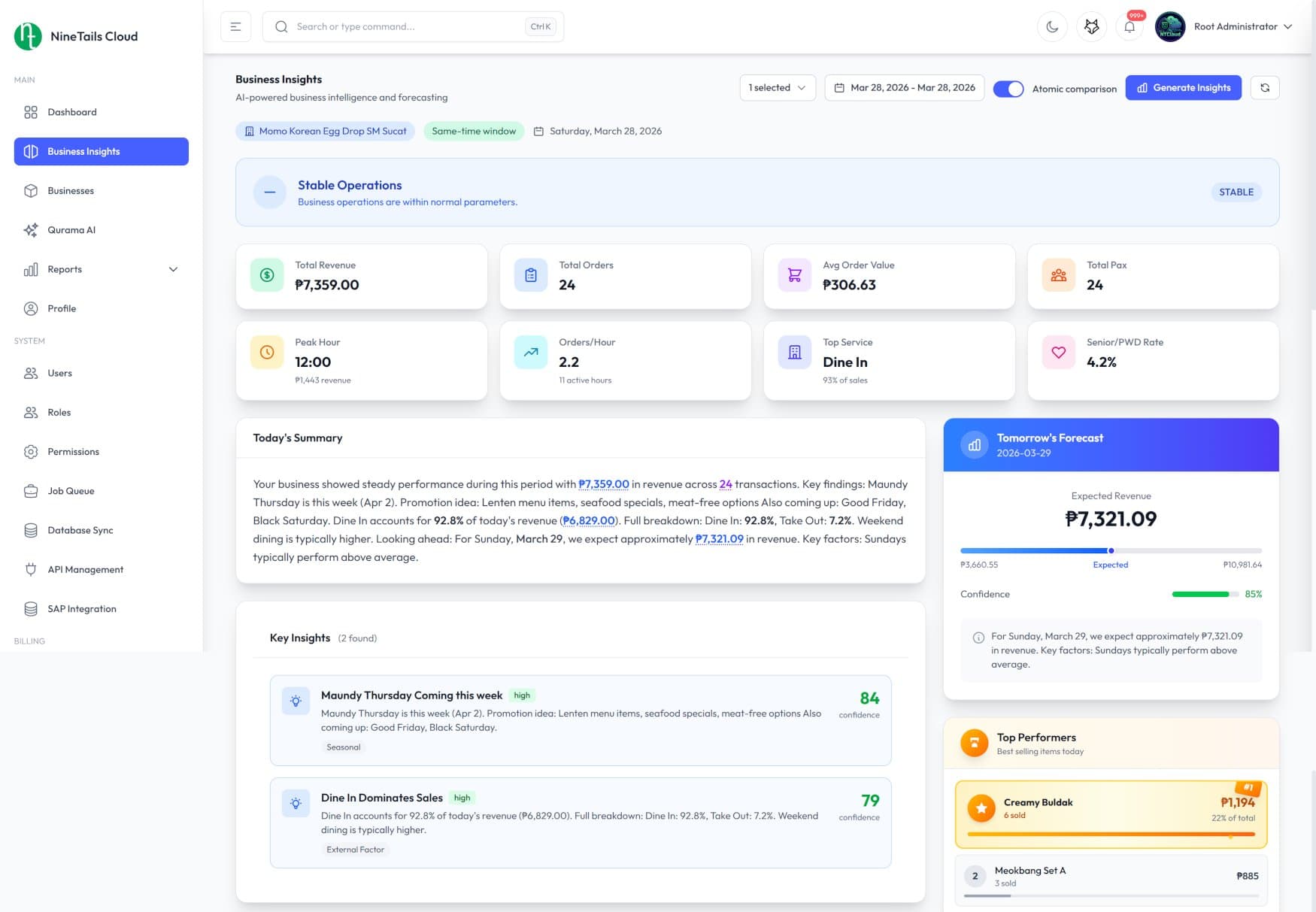
AI Business Insight
Daily summaries built from your own branch data: what is moving, what needs attention, and tomorrow's expected revenue.
Fraud Detection
Unusual cancelled orders, discounts, and refunds are flagged across every branch, with the full transaction behind each one. A person reviews it and decides.
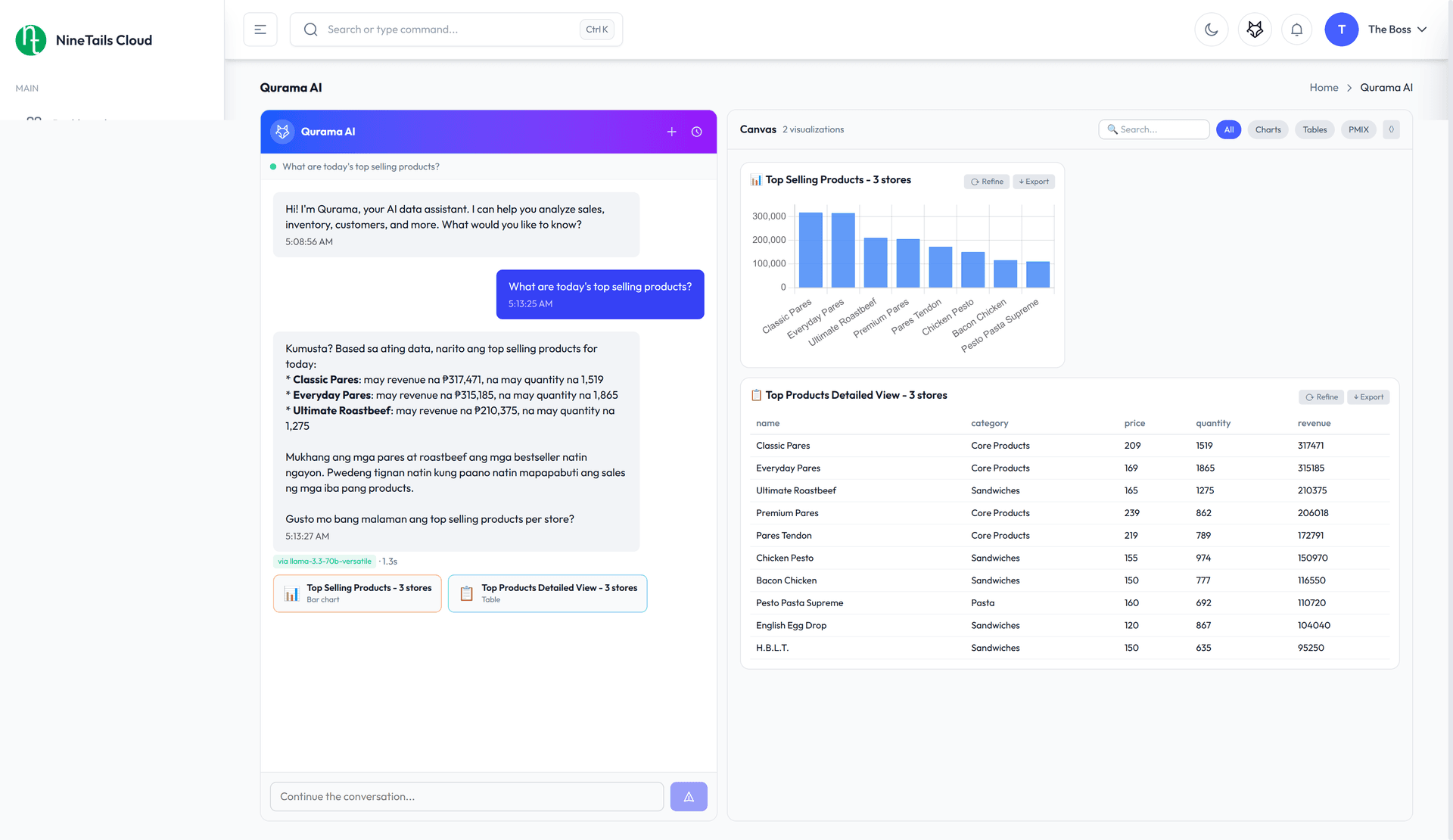
Qurama AI Assistant
Ask in plain language, like "Which branches show unusual discount or cancelled-order patterns?", and get answers from your combined data.
Questions groups ask first
- NTCloud and its AI
The online dashboard behind it.
- Multi-branch POS
The same POS at every branch counter.
- Franchise POS
For franchisors who want to see their franchisees' branches.
A service that sends every branch's sales to one NTCloud dashboard, so you see all your branches up to date instead of putting the numbers together by hand. You keep the POS you have. NTCloud is our online dashboard, built by Logic8.
No. A small program called the Sync Utility reads each branch's POS data and sends it to NTCloud. Because every POS stores its data differently, we study yours at a pilot branch and match it to NTCloud before anything goes live. We do not publish a list of supported systems for that reason. Branches that use BOSS POS send their sales to NTCloud directly.
No. The Sync Utility only reads. It never changes anything in your POS, so there is nothing to replace and nothing to retrain.
The branch keeps working. The data waits in a queue at the branch and uploads by itself, encrypted, when the connection is back.
Each day is checked against the branch's end-of-day report. At the pilot branch, the totals must match before we move on to the next branch. You can also send us one branch's sales file and we will show it on the dashboard before you commit.
Each person gets the access that suits their job. Head office sees every branch and each branch sees only its own. You can log in to NTCloud yourself and see what each kind of account can open.
Qurama answers from your own sales, and forecasts are built from your own sales history. Fraud detection flags something unusual and shows the details for a person to review. It helps with a decision and never accuses anyone.
The price depends on how many branches you have and what systems they use. Book a demo or ask for a quote and we will put it in writing.
Send us one branch's sales file.
We will put it on the NTCloud dashboard so you can judge it on your own numbers.
Message us, we usually answer first